
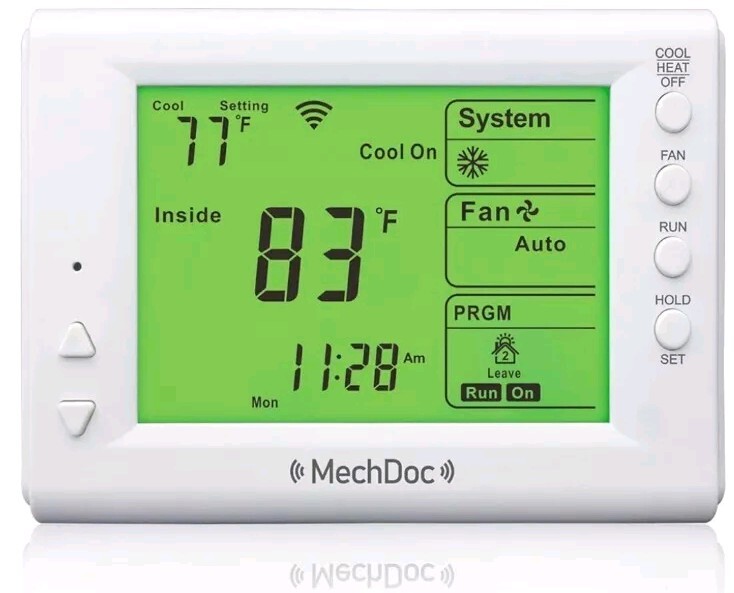

Smart Thermostat, Compatible with Alexa and Google Assistant, 7 Day Programmable
$ 18.48
Description
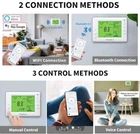
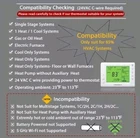
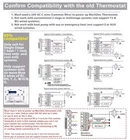
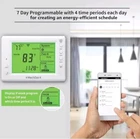
Smart Thermostat, Compatible with Alexa and Google Assistant, 7 Day Programmable WiFi Thermostat for Single Stage 1 Heat/1 Cool HVAC, APP & Voice Control, 24VAC Power, C-Wire Required, White Android and iOS apps, Amazon Alexa, Google Assistant, Hand Control Special Feature: Programmable, Temperature Control, Temperature Display, Fan Control Wide Range Application - Works with 85% Systems: Single Stage 1 Heat and 1 Cool HVAC Systems of Gas or Oil Heat, Electric Furnaces, Heat Pump without Aux Heat, Cool/Heat only System (Floor or Wall Furnaces). Not support 110V/220V system! - Before buying, check the #4 main image to see the wiring diagrams. Our thermostat only supports conventional systems and heat pump systems with no more than 6 wires of RC, RH, C, G, W/O/B, Y. (RC/RH: cooling/heating power; C: C wire; G: fan switch; Y: Cooling switch; W: heating switch; O/B: heat pump changeover valve). Take off your thermostat, and take a photo of the wire connections for later reference. Use sticky tags to label each wire as you disconnect it. 24VAC Power Supply Needed - Important! C-wire is required and is the primary power source for our thermostat. Battery Power NOT Supported! Without a C-wire, our thermostat will not power up (e.g. LCD will not light up), and it means our thermostat cannot be used in your system. Before purchasing, check if the C-wire has been installed in your home, or determine if your home needs a C-wire power adapter. C-wire and C-wire power adapters are sold separately. Smart Home Integration - This 7-Day Programmable Smart Wifi Thermostat works with voice assistant devices like Amazon Alexa and Google Assistant. Easy Programming and Energy Saving - Take advantage of the 7-day with 4 periods per day flexible programming schedules to optimize your energy consumption and fit your life. Easy-to-Use-APP - Choose from the Smart Life app, Alexa app, or Google Assistant to control your Wi-Fi thermostat anytime, anywhere. (Only Support 2.4 GHz Wi-Fi, NOT Support 5 GHz Wi-Fi) Easy Operation and Reliable- 6.8 sq. inches’ Big backlit digital display and easy controls make for a user-friendly experience. And designed for long-lasting performance, our Wi-Fi thermostat offers reliable performance and precise temperature control. Find an extra wire as a C wire - If you don’t have a C wire, check if an extra wire can act as a C wire, it might be pushed into the wall or wrapped around the wire bundle. Find it and connect this unused wire to the C terminal on our new thermostat, connect the other end of the C wire to the C terminal on the control board of your heating/cooling system. Use G wire as C Wire - If has no extra wire as C wire, you could use G wire as the C wire for a furnace that burns gas or propane (this solution does not support a furnace that burns oil) and a heat pump WITHOUT backup (auxiliary) heat. Find the wiring terminals G, W (or Y), and C on the furnace or air handler control board, unscrew the G terminal, and move the G wire to the C terminal to act as the C wire. Then use a jumper wire (not included but will have) to connect the W (or Y) terminal to the G terminal for the fan control. Using the G wire in this manner means you can’t run your system fan continuously. The fan will run when the system is heating (when connecting to W) or cooling (when connecting to Y). Cautions!!! - Please check the system compatibility carefully before buying! Please read the installation manual especially the wiring diagrams carefully before installing. Wrong wiring might damage the thermostat! For example, if the thermostat cannot turn on when installing, please first check if it is compatible with your system. If compatible, please check if your 24VAC power is ok or maybe you need to hire a local HVAC Tech to install the thermostat for you. Note - The backlight of the LCD will automatically shut off if no operation in about 30 seconds. If you press any key on the thermostat, the backlight of the LCD will illuminate again. The system clock of the thermostat will automatically synchronize with the cellphone when Wi-Fi is connected successfully.


