Smart Touch HomeKit Panel Switchman M5
$ 117.43
Description
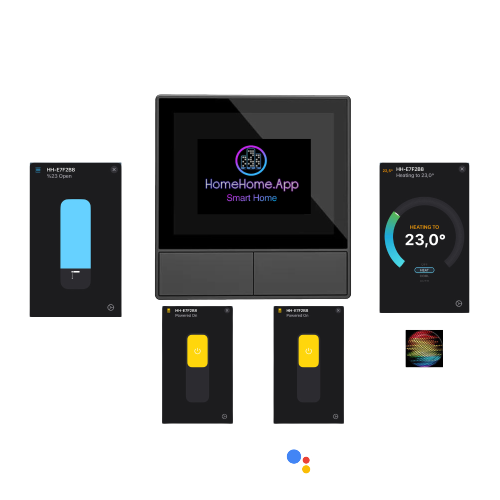
Smart Touch HomeKit Panel Switchman M5 Smart Touch HomeKit Panel Switchman M5 2 Modes + Thermostat + 16 Scenes Mode 1-Normal On-Off Switch Update 10.2023 Alexa Support for On Off mode Mode 2-Shutter mode to control Roller Shutters, Curtains, Blinds, Jalousie… Internal temperature sensor with Thermostat screen: Remotely control your heater – boiler relay (another device in your home with home automation) Switches onboard AC in and AC out AC voltage relay output, On-off mode, Motor mode, EU Standard 86x86x41.7mm Wattage: 300-600 is_customized: Yes Voltage: 110-240V Model Number: NSPANEL Brand Name: HomeHome.App Origin: Mainland China Certification: FCC Support: HomeKit Supports: Google Home Dimension: 86X86X42 mm Wireless Standard: 802.11 b/g/n 2.4GHZ Color: Black Max Wattage: 150W/110V/Gang, 300W/110V/Total, 300W/220V/Gang, 600W/220V/Total Max current: 100-240V~ 50/60Hz 2A/Gang 4A/Total Gang: 2 Weight: 220 gram Roller Shutter Mode: Roller Shutter Curtain Blinds Mode: Curtain Blinds Switch Mode: On Off Voice Control: Siri Google Voice Control: Google Assistant FCC Certification: FCC Feature: WiFi Dual On Off Switch / Roller Shutter Smart Home: Smart WiFi Switch System Support: IOS Android Touch Screen: Yes Screen Size: 3.5″ Screen: 480*320 Firmware: HomeHome.App Apple HomeKit NSPanel Touch Screen Scene Here ! Everything at once! Apple HomeKit Google Home Web UI 3.Party WebSocket protocol integration, Local Http server. All in one with a single iot device No Additional Hub Required: Unlike some other smart home devices, this relay module doesn’t demand an extra hub or gateway. The simplified setup not only reduces complexity but also saves you costs, ensuring an efficient and straightforward solution.Home app requires Apple TV or HomePod and Alexa app requires Amazon Alexa. No Hub / Gateway required for Google Home, controlling from local IP address or HomeHome.App web interface. Features Power of ESP32 with our special firmware Super Easy Setup You will easily setup with single page, user friendly form. FAQ Q:How to setup? When you plug the device it will broadcast WiFi network : “HomeHome-xxxxxx” Password is “homehome” Join the network, make setup in captive portal; -Select your device type -Enter gmail address -Select your router and enter password -Save. You can change other device settings by entering ip address of your device like: Auto Turn Off Feature – Set relay auto off from 1 second to 24 hours . Q:Internet Required? You can use Apple HomeKit and local http server (write your device ip in to a web browser) without internet. Google Home and Web UI needs internet connection. Q:Updating device firmware? If there is a firmware update, you can upload firmware file, check support page.